Why don't I see any Returning visitors in Siteimprove Analytics?
Summary
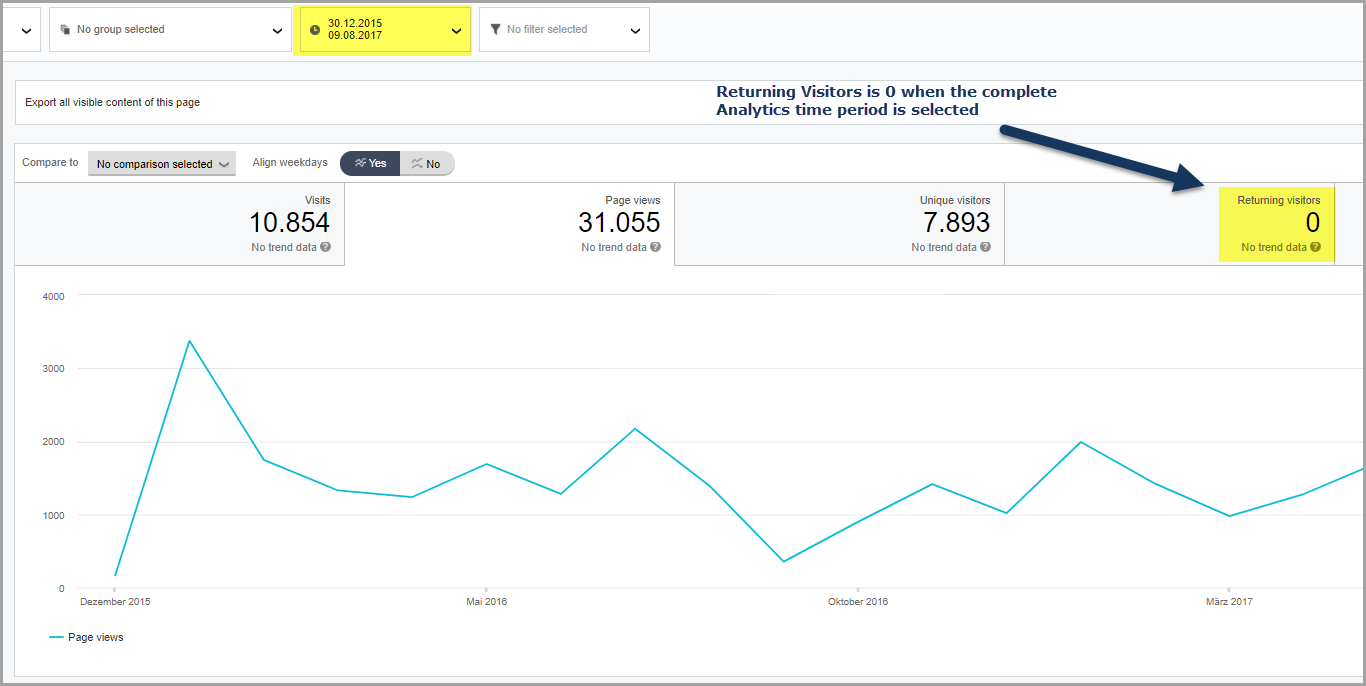
Returning visitors may show as 0 because Siteimprove calculates them by comparing the selected time period with a previous period. If you select the full tracking period, there is no earlier data to compare, so returning visitors will appear as zero.
Symptoms
- You do not see any Returning visitors in Analytics
- Returning visitor count appears as 0
Cause
In Analytics, the Returning visitor statistics are calculated by comparing the currently selected period with the previous period.
- If you choose “today”:
- Today’s data is compared with yesterday’s data
- Returning visitors = users who visited during both periods
If you choose the complete time period for which visitor behavior has been tracked:
- There is no previous period available for comparison
- Therefore, the number of Returning visitors is zero
Resolution
Reduce the span of the selected time period to less than that of the complete tracking time period.
This ensures:
- A previous comparison period exists
- Returning visitor data can be calculated and displayed
Validation
- Change the selected date range (e.g., from “All time” to “Last 7 days”)
- Recheck the Returning visitor’s metric
- Confirm that the value is now populated
Prevention Tips
- Avoid selecting the full tracking period when analyzing returning visitors
- Use periods that allow comparison (e.g., day-over-day, week-over-week)
- Remember: returning visitor metrics always depend on comparison windows
Did you find it helpful? Yes No
Send feedbackSorry we couldn't be helpful. Help us improve this article with your feedback.