What does it mean to share a dashboard template?
Summary
Sharing a dashboard template lets another Siteimprove account import a copy of a dashboard template. The imported dashboard is a replica of the original dashboard at the time it was shared, and later changes to the original dashboard are not reflected in already imported copies.
Overview
A shared dashboard template is a copy of a dashboard that can be imported by another Siteimprove account. When a dashboard template is shared, it is a replica of the dashboard at that point in time. Any later changes made to the original dashboard will not update the imported dashboard template.
Question
What does it mean to share a dashboard template?
Answer
The Siteimprove Intelligence Platform (SIP) now provides global and customizable dashboards. Once you have created a useful dashboard for your own use, it's possible to share the dashboard template with other organizations who subscribe to Siteimprove.
You need to be an Account Owner or Administrator to create dashboards.
For example, if you have created an Analytics dashboard with a selection of widgets that would be useful to other organizations, you can share the dashboard template with them.
Note: To share a dashboard with users on your own account you can configure the dashboard as shared. See: Configuring Siteimprove Dashboards and Dashboard reports
How to share a dashboard template
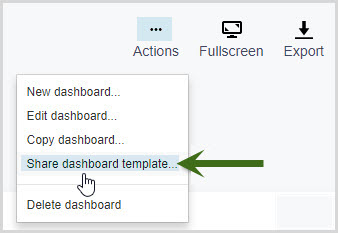
To share a dashboard template:
- Select Actions > Share dashboard template.
- Click Copy link.
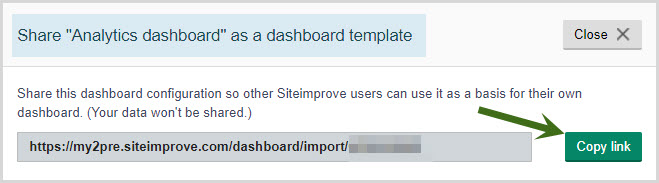
- Send this link to a user logged in on another Siteimprove account (or switch account).
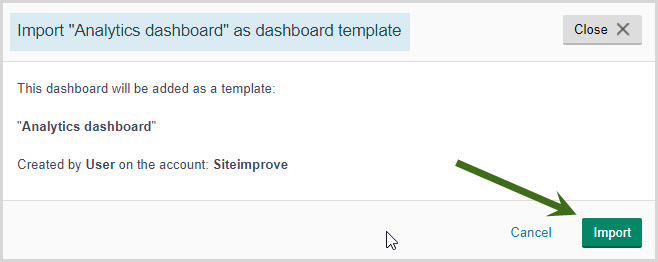
- Open the copied link in the browser window.
- Click Import to see the newly imported dashboard.
- Select a site to view the dashboard presenting widgets that correspond to the new account.
Important notes
When a Dashboard template is shared, it is essentially a replica of the dashboard at that point in time. Any subsequent changes made to the original dashboard will not be reflected for those who have already imported the dashboard template.
Note: Any account specific dashboard widgets will be empty and can be re-configured for the new account using the edit option in the top-right corner of the widget.
Also, an imported dashboard is available to the user importing, i.e. 'only me', by default. You can change the access afterward by editing the dashboard settings.
Check out the Dashboard template library for a list of commonly used dashboard report templates.
Sample dashboard template
As well as the current global dashboards, we’ve prepared a sample Redesign dashboard template that we’d like to share with you. The dashboard shows various widgets from SIP to help you track important data when going through a redesign project on your website!
Name: Redesign Dashboard Template
Link: https://my2.siteimprove.com/dashboard/import/u_kCynLZTUCYKUTC6rxg5w
Widgets included:
- Crawl Info
- Score details
- QA Score details
- Accessibility
- Progress of broken links, misspellings, broken links in PDFs
- Pages with broken links
- Progress of links to documents that do not open in a new tab – if the policy does not exist, it can be created from the Policy Library
- Progress of Multiple short words in succession – if the policy does not exist, it can be created from the Policy Library
- Progress of “Lorem Ipsum” placeholder text – if the policy does not exist, it can be created from the Policy Library
- Analytics Most popular pages
- Analytics Page Load Time
Did you find it helpful? Yes No
Send feedback