Why do my groups not contain any pages?
Summary
Groups appear empty when no pages meet the defined matching criteria or when those pages are unavailable in the crawl data used to populate groups.
Problem
You have created groups in Siteimprove but your groups are not pulling in any pages based on the common element in the URL, breadcrumb, or page title. Why is this happening?
Causes
Cause 1
The page was not found during the previous crawl – Groups can only contain pages found in the crawl. If pages are missing, check your Site Content Settings.
Cause 2
A redesign or restructuring of the website may mean that groups are empty because the URL structure has changed.
Cause 3
Pages have been excluded from the crawl – Another user may have updated your settings. See: Site Content Settings
Cause 4
The common element in the URL, breadcrumb, or page title has been configured incorrectly when setting up the group.
Cause 5
The common element in the URL, breadcrumb, or page title cannot be found or does not exist.
Resolution
Editing content group matches
In most of the cases described above you can resolve the issue by investigating the Quality Assurance group matches at Quality Assurance > Summary > Groups, then edit the match by clicking on the pencil icon for the group you want to edit. 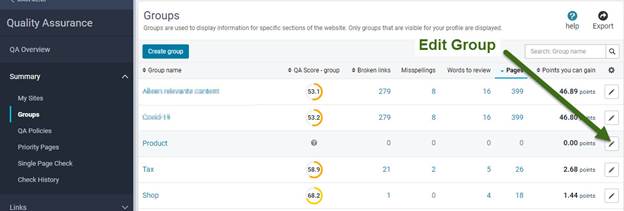
Note: When replacing a group match, remember to delete old matches to avoid inconsistencies. 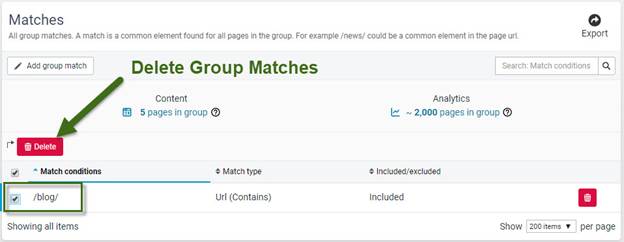
If after editing, the group still contains no pages, check the site settings to make sure that the pages have not been excluded from the site crawl. See Site Content Settings
Note: Editing matches in Quality Assurance affects the same groups in the SEO, Policy, and Accessibility tools but not Analytics. You need to edit the match for the same groups in Analytics separately. Go to Analytics > Content > Summary > Groups, and use the edit icon on the right.
Did you find it helpful? Yes No
Send feedback