How does switching from a non-JS crawl to a JS crawl affect my data?
Summary
Switching from a non-JS crawl to a JavaScript crawl can significantly change your data because JavaScript execution affects what content is discovered, how many pages are found, how issues are calculated, and how analytics are recorded.
FAQ Question
How does switching from a non-JS crawl to a JS crawl affect my data?
Answer
A JavaScript crawl executes JavaScript (JS) however an non-JS-crawl does not.
Having JavaScript execute on a website can result in different content being seen during the crawl than when JavaScript is not executed. This is comparable to the difference between the content seen on a website page when JavaScript is enabled or disabled on your browser.
Switching to a JavaScript crawl can affect these areas.
- Page Numbers
- DCI Score
- Crawl Time
- Website analytics
Page Numbers
The difference in the content on the page depends on the amount of JavaScript, the interactions, and the content being loaded by those interactions.
This can result in a difference in the number of links being found during a crawl, either more or less, depending on the website setup and the links being loaded using JavaScript. This, in turn, can lead to a different number of pages being found.
DCI Score
The Digital Certainty Index® (DCI®) is calculated based on a website's performance across three categories: Quality Assurance, SEO, and Accessibility.
A change in the number of pages will usually lead to a change in the number of issues found so, therefore, affecting the DCI Score.
Crawl Time
The time it takes to crawl a site can increase for the following reasons when you switch to a JavaScript crawl:
- Execution of JavaScript is an extra step in the crawling process requiring extra time
- Execution the JavaScript can result in additional content being found adding to the processing time
Website analytics
Apart from the impact on the content found, a JavaScript crawl can affect your website analytics. Many websites use JavaScript to gather web analytics data. In these cases, a JavaScript crawl by Siteimprove will trigger web analytics leading to more page views/impressions.
In order to avoid seeing traffic from the Siteimprove JavaScript crawl in your web analytics solution, you can exclude this traffic from being tracked. For a non-Siteimprove Analytics solution, you can exclude the Siteimprove crawler IP address from your analytics traffic using a filter. Siteimprove automatically excludes our crawler IP addresses from Siteimprove Analytics.
Sites overview
Curious about which of your sites are crawled with JavaScript?
In the Siteimprove platform, head over to Settings > Crawler Management > Site overview and check the "Crawl type" column.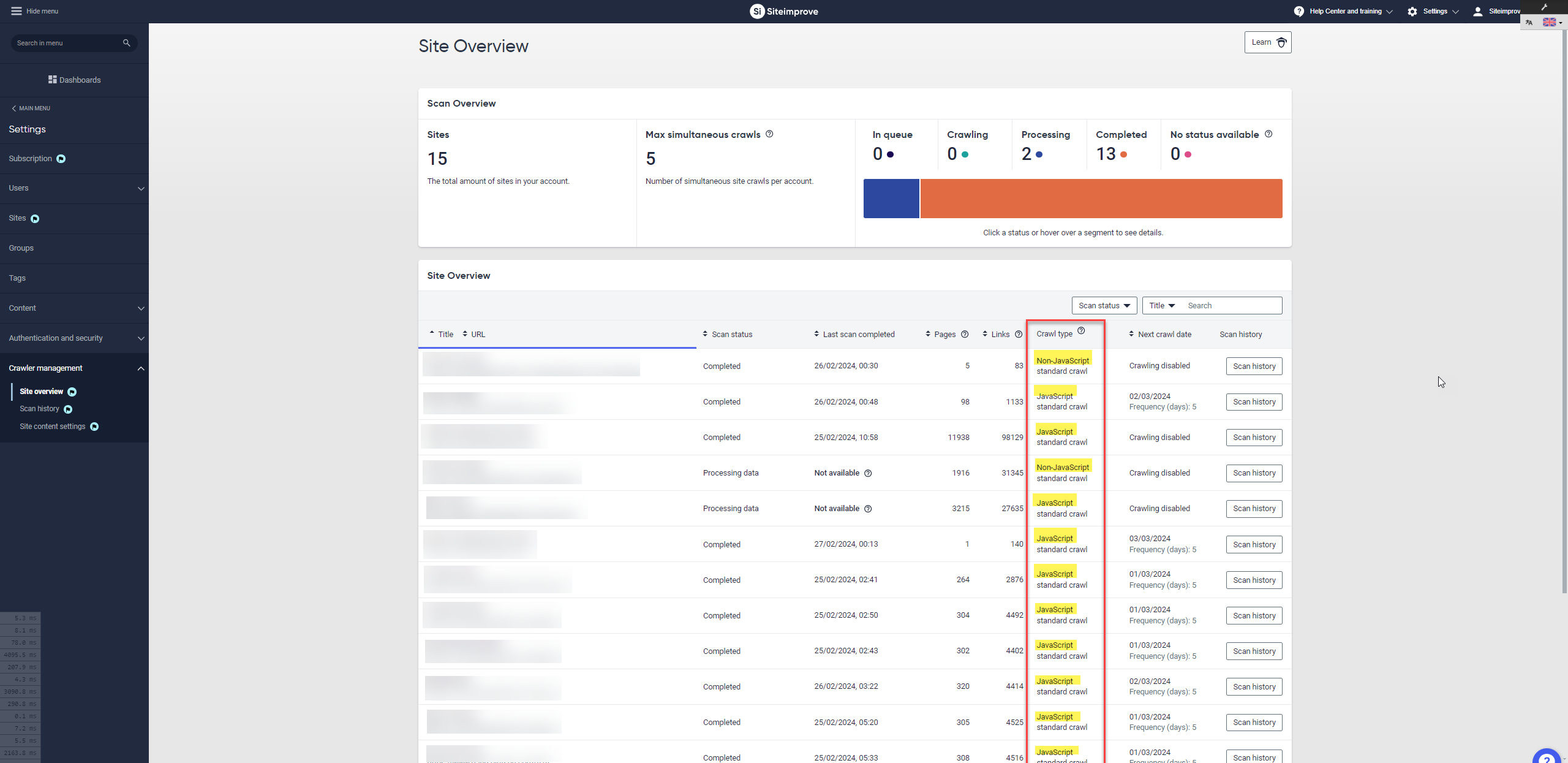
Terminology Clarifiers
Non-JS Crawl
A crawl that scans only the raw HTML of a webpage without executing JavaScript.
- Does not render dynamic content
- Faster, but may miss JS-loaded elements
JS Crawl
A crawl that executes JavaScript before analyzing the page.
- Renders dynamic and interactive content
- Provides a more complete view of what users see
Key Difference
- Non-JS Crawl: Static HTML only
- JS Crawl: Rendered, browser-like experience
Environment / Applicability
- Platform: Siteimprove
- Feature: Crawler Management
- Scope: JavaScript vs Non-JavaScript crawling
- Use Cases: SEO, Accessibility, QA, Analytics validation
Did you find it helpful? Yes No
Send feedback