Configure Siteimprove Site Mapping in Sitecore On-Premise CMS Plugin
Summary
Configure Siteimprove site mapping in Sitecore
Environment / Applicability
- Siteimprove Settings and Site Mapping
- Required Site Mapping Fields
- Language Field Behavior
- Virtual Folder Field Behavior
- Multi-Site and Multi-Directory Setup
- Experimental (from plugin version 2.2): URL Redirect Rules for Bucketed Paths
Steps
Siteimprove Settings and Site Mapping
“Siteimprove Settings” path: /sitecore/system/Modules/Siteimprove/Siteimprove setting
NOTE: Multiple “Siteimprove setting” items can be defined.
Select site root items in the “Sites” field
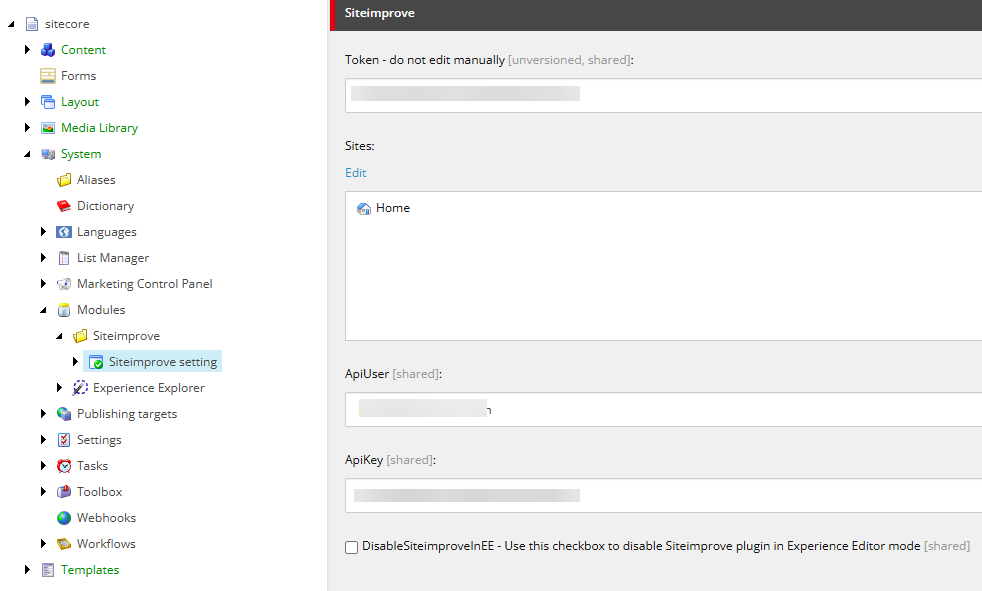
Add child SiteimproveSiteMapping items for each site/domain combination.
Multiple Siteimprove setting items are supported. If a given site is not mapped to any of these items, the default item specified in the siteimprove.config file is used as a fallback.
Required Site Mapping Fields
Each mapping requires:
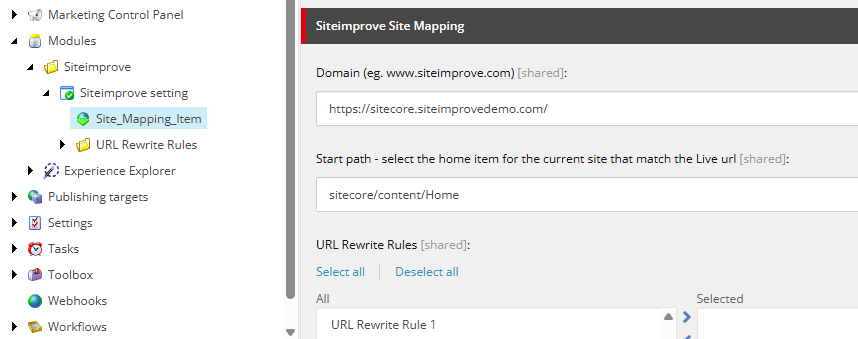
- Domain — This should be the live, published site domain that we are crawling in the Siteimprove platform. The URL should include the HTTP or HTTPS protocol.
For example: Agentic Content Intelligence - Siteimprove instead of Agentic Content Intelligence - Siteimprove. - Start path — This should be the home item path in Sitecore’s directory tree for the site crawled in the Siteimprove platform.
Language Field Behavior
The Language field controls whether a language segment is included in generated plugin URLs.
![Sitecore Language field labeled 'Select the language for the website [shared]' with the value set to 'en'.](https://s3-eu-central-1.amazonaws.com/euc-cdn.freshdesk.com/data/helpdesk/attachments/production/80612025936/original/gZ0pk5xwWqGhynnmPPtc45Ddf_OHytAkuA.png?1787655830)
Examples:
- With the “Language” field blank, the language directory will be included. For example: https://www.example.com/en/about
- With the “Language” field filled in—with “en,” for example, for English—the language path will be removed. For example: https://www.example.com/about
Virtual Folder Field Behavior
The Virtual Folder field adds or removes a path segment in generated URLs, similar to path rewriting.
![Sitecore Virtual Folder field labeled 'If the site uses a virtual folder, enter the path here eg. "/virtualfolder" [shared]' with a forward slash (/) entered as the value.](https://s3-eu-central-1.amazonaws.com/euc-cdn.freshdesk.com/data/helpdesk/attachments/production/80612025474/original/-GWlvR5uNMhCJ7du4xIB4m1vUyI84rfz6A.png?1787655785)
Examples:
Virtual folder empty: https://www.example.com/about
Virtual folder /corporate: https://www.example.com/corporate/about
Multi-Site and Multi-Directory Setup
Use one mapping per domain/root pattern. Do not rely on one broad mapping for unrelated URL structures.
Example mapping set:
Domain https://www.company.com, root /sitecore/content/company/site-a/home, language en, virtual folder empty.
Domain https://www.company.com, root /sitecore/content/company/site-b/home/products, language en, virtual folder /products.
Experimental (from plugin version 2.2): URL Redirect Rules for Bucketed Paths
This feature is used when the public URL shape is controlled by your delivery layer (application routing, rewrite rules, CDN/edge rules, or Sitecore link generation customization). The Siteimprove plugin should receive the final public URL after rewrites.
Recommended implementation options
Add a URL Rewrite Rule under /sitecore/system/Modules/Siteimprove/Siteimprove setting/URL Rewrite Rules. You can use regex-based mapping rules.
![Sitecore content tree with URL Rewrite Rule 1 selected under System > Modules > Siteimprove > Siteimprove setting > URL Rewrite Rules, showing the URL Rewrite Rule panel with a Pattern field containing '^/en/insights/[0-9]{4}/[0-9]{2}/((?:[^/]+))$' and a Replacement field containing '/en/insights/$1'.](https://s3-eu-central-1.amazonaws.com/euc-cdn.freshdesk.com/data/helpdesk/attachments/production/80612027684/original/bFZGoW0Z0k-UxsuBhyD3r2GFGGAVtryFNA.png?1787655993)
Select URL Rewrite Rules that you would like to use for specific sites under /sitecore/system/Modules/Siteimprove/Siteimprove setting.
Example mapping rules
Remap pages - pattern: ^/pages(.)$, replacement: /newpages$1
Remap legacy people alpha folders to a flat structure - pattern: ^/en/people/[a-z]/[a-z]/(.)$, replacement: /en/people/$1
Remove date folders under insights - pattern: ^/en/insights/[0-9]{4}/[0-9]{2}/((?:[^/]+))$, replacement: /en/insights/$1
Remove a fixed content prefix and keep the page segment - pattern: ^/content/we-retail/us/en(/.*)$, replacement: $1
This regex converts URLs like /content/we-retail/us/en/about-us to /about-us
Trusted regex reference for .NET syntax
Learn - Regular Expression Language - Quick Reference (Microsoft Learn)
Playground recommendation - regex101: build, test, and debug regex (.NET flavor is selected by default)
Related Articles
Did you find it helpful? Yes No
Send feedback